
Online printing has never been easier or more fun! No software to download. Multiple platforms supported and ready to go on your browser of choice. Our intuitive web app makes it a snap to print high quality photos, from your phone, tablet or computer from the comfort of your home or office. You can even upload from Drop Box or Google Drive! Choose from many print sizes 4x6, 5x7, 8x10, 11x14, 12x18, and many more. For over 50 years Artcraft Photoworks has been the Hudson Valley’s premier destination for photographers, artists, and families who refuse to settle for drugstore quality. Located at 520 Albany Avenue in Kingston, NY. We combine Old-School Photo Lab precision with cutting-edge printing technology to deliver prints that last for generations.
Whether you are a parent preserving family milestones or a professional photographer our online platform makes it easy to get professional results from the comfort of your home.
Why Choose Artcraft Photoworks for Your Printing?
1. Archival Quality
Unlike standard drugstore prints that fade over time, our printing process uses high-resolution inkjet technology and archival inks. We offer a curated selection of premium papers, including:
● Luster & Glossy: Perfect for vibrant family portraits and crisp landscapes.
● Fine Art Rag & Watercolor Paper: Ideal for artistic reproductions with a sophisticated texture.
● Canvas Wraps: Museum-grade canvas stretched and ready for your wall.
2. Seamless Online Ordering Platform
We’ve built our online store to be intuitive for every generation. Our platform allows you to:
● Upload photos directly from your phone, tablet, or computer.
● Choose custom sizes from 4x6 snapshots to 40x45 statement pieces.
● Add professional mounting or foam core backing with a single click.
● Get Started Here: Artcraft Online Ordering
3. Expert Human Oversight
At Artcraft, your photos aren't just processed by a machine. Every order is overseen by Artcraft’s experts with decades of experience in color correction and image clarity.
4. In-Store Kiosks
We also have in-store Kiosks where we can guide you through the ordering process. These accept Flash Drives, Memory Cards, Cd’s, Dvd’s and you can also connect your phone or iPad. Just stop in and we can assist you.
Full-Service Photo Lab for Every Project
● Film processing: We process color and Black and white film in-house, so no need to mail it out of town and wait weeks to get it back.
● Custom Picture Framing: Museum-quality frames, custom-built in-house.
● Photo Restoration: We can fix cracks and fading in family heirlooms.
● Video, Film Photo & Slide Scanning: Digitally preserve your old media before it deteriorates.
● Other Store services include audio tape conversion, dslr sensor cleaning, passport photos, digital slideshow, studio photography, movie film transfer, media card recovery and much more!
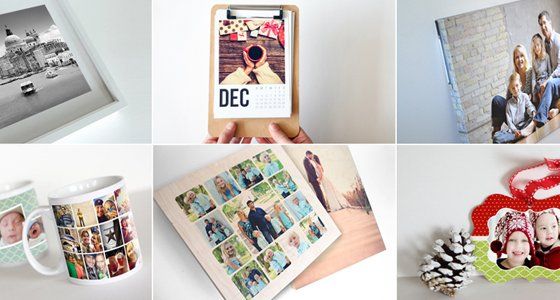
● Photo products The best gifts are those that tell a story. Choose a photo and begin telling your story through personalizing one of the many products we offer. Give the gift that keeps on giving. Whether it's personalized blankets, puzzles, cutting boards, ornaments, or drinkware they are inspired by life, but created by you. You add your photo and if you wish you can add a personal message to create a treasure that will be cherished. Order your photo gift today!
Frequently Asked Questions: Ensuring Elite Image Quality
At Artcraft Photoworks, we are committed to High-Quality Output. To achieve a professional-grade print, we require high-quality source files. Below are answers to common questions regarding image resolution and file types.
Q: Why shouldn't I print a photo that was texted to me?
A: When an image is sent via standard text message (SMS), your phone automatically "compresses" the file to make it send faster. This process strips away up to 90% of the image data, leaving you with a small, low-resolution file. While it looks fine on a tiny phone screen, it will appear blurry or "pixelated" when printed. For the high-quality results Artcraft Photoworks is known for, always use the original digital file or send images via email as "Actual Size" or "Full Quality."
Q: Can I print a "Screenshot" from my phone or computer?
A: We strongly advise against printing screenshots. A screenshot only captures the "screen resolution" (usually 72–96 DPI), which is far too low for a professional print (which requires 300 DPI). Screenshots also often capture menu icons or black bars. To get a sharp, vibrant print that outperforms drugstore quality, you must upload the original high-resolution photograph.
Q: Why does my photo look great on my phone but blurry when printed?
A: Phone screens are backlit and incredibly dense, which can hide flaws in low-resolution images. Printing requires significantly more "data" per inch to look sharp. If your file size is very small (less than 1MB), it likely doesn't have enough information to create a high-quality print. Our Online Ordering System will often alert you if your resolution is too low for the size you’ve selected.
Q: How does Artcraft compare to Walgreens, CVS, or Walmart quality?
A: Big-box stores use dye-sublimation printers designed for speed and "good enough" snapshots. Artcraft uses Archival paper and pigment-based inks. This results in a wider color range, deeper blacks, and a print that won't fade for over a century. If you want a print that is "Wall-Ready" and gallery-standard, the drugstore cannot compete.
Q: What is the best way to get my high-res photos to you for local pickup?
A: The most efficient way is to use our web based Online Upload Tool. It handles large, high-resolution files easily. Once uploaded, you can select your sizes and finishes, and simply swing by our studio at 520 Albany Ave to pick them up when they are ready.
